Understanding Jenkins Pipelines: A Beginner-Friendly Guide
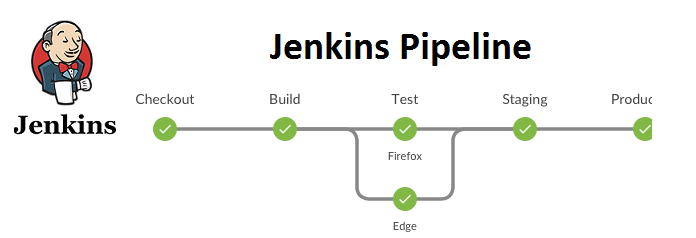
As a DevOps engineer, creating a Jenkins pipeline is one of the most common tasks. But before jumping into writing one, let’s first understand the types of pipelines:
1. Static Pipeline
This type of pipeline is specifically written for a particular node or machine. It is not flexible and is generally avoided in modern setups.
2. Declarative Pipeline
This pipeline is written using Groovy syntax. It allows you to define stages and steps in a clear and structured manner. Declarative pipelines are preferred because they are easier to maintain and more readable.
Now that we understand the types, let’s move on to writing a pipeline in Groovy syntax.
Setting Up Your Jenkins Pipeline
Here’s a step-by-step guide to setting up a Jenkins pipeline:
1. Create a New Pipeline
- Go to New Item and provide a name for your pipeline.
- Add a description to explain the purpose of the pipeline.
2. Configure the Pipeline Options
Below are the commonly used configuration options in Jenkins pipelines:
- Discard Old Builds: Limits the number of saved builds. For example, keep only the latest builds and discard the older ones.
- Don’t Allow Concurrent Builds: Prevents multiple builds from running simultaneously.
- Do Not Allow Pipeline to Resume After Controller Restart: Stops paused pipelines from resuming automatically after a restart.
- GitHub Project: Link your GitHub repository by pasting the URL here.
- Pipeline Speed/Durability Override: Adjust the speed of the pipeline if needed.
- Preserve Stashes from Completed Builds: Save logs and artifacts from the build for future reference.
- Parameterized Builds: Add parameters (e.g., specify a branch like
dev) to customize the build process. - Throttle Builds: Restrict the number of builds (e.g., a maximum of 5 per day).
- Poll SCM/GitHub Hook Trigger: Automatically trigger the pipeline when new code is pushed to GitHub.
- Build Periodically: Schedule the pipeline to run at specific intervals using cron jobs.
- Build After Other Projects: Trigger this pipeline only after the completion of another project.
- Quiet Period: Introduce a delay before triggering the build.
- Trigger Build Remotely: Use shell scripts and authentication tokens to trigger the build.
Note: If your project is private, Jenkins can clone the repository securely.
Writing a Jenkins Pipeline in Groovy Syntax
Here’s an example of a declarative pipeline in Groovy:
pipeline {
    agent any
    stages {
        stage('Code') {
            steps {
                echo 'Code has been cloned.'
            }
        }
        stage('Build') {
            steps {
                echo 'Docker image has been built.'
            }
        }
        stage('Test') {
            steps {
                echo 'Tests were executed during the Docker build process.'
            }
        }
        stage('Deploy') {
            steps {
                echo 'The app is running using the Docker run command.'
            }
        }
    }
}
Running the Pipeline
- Press the Play button to start the pipeline.
- Watch the magic happen as each stage runs successfully.
Youtube Link: https://www.youtube.com/playlist?list=PLDw5C8AZ-iZaJjgn9d2vBEjmcKfXqpov2
Final Words
This blog covered the basics of Jenkins pipelines, key configuration options, and how to write and execute a pipeline in Groovy. I hope you found it useful! Stay connected for more DevOps tips and tricks.


Comments
Post a Comment