DevSecOps Project Setup — A Step-by-Step Guide
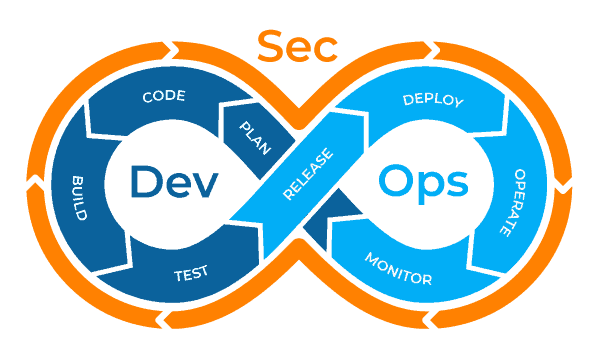
Introduction
In this project, we’ll build a DevSecOps pipeline using the following tools:
- JDK + Jenkins — Automation server for CI/CD
- Docker — Containerization platform
- SonarQube — Code quality and security scanner
- Trivy — Container image vulnerability scanner
- OWASP Dependency Checker — Identifies security risks in dependencies
- Docker Compose — Manages multi-container Docker applications
Project Workflow
- Developer pushes code to GitHub
- SonarQube scans the code for quality and security
- Docker builds the image
- Trivy scans the image for vulnerabilities
- Image is pushed to DockerHub
- Deploy the image on AWS EC2 or any other server
Setting Up the Environment
1. AWS EC2 Setup
We’ll use an AWS T2.large instance to handle multiple tools running together.
2. Install Java (JDK 17)
Run the following commands on your EC2 instance:
sudo apt update
sudo apt install fontconfig openjdk-17-jre -y
Jenkins Installation & Setup
Jenkins has two types of releases:
- Weekly Release — Gets updates every week (not recommended for stability).
- Long-Term Support (LTS) — More stable, updated every 12–13 weeks (Recommended).
Installing Jenkins (LTS Version)
sudo wget -O /usr/share/keyrings/jenkins-keyring.asc \
  https://pkg.jenkins.io/debian-stable/jenkins.io-2023.key
echo "deb [signed-by=/usr/share/keyrings/jenkins-keyring.asc]" \
https://pkg.jenkins.io/debian-stable binary/ | sudo tee \
/etc/apt/sources.list.d/jenkins.list > /dev/nullsudo apt-get update
sudo apt-get install jenkins -y
Check Jenkins Status:
systemctl status jenkinsJenkins Web Interface Setup
Jenkins runs on port 8080. Allow access from your IP only in AWS security groups.
- Get Admin Password:
sudo cat /var/lib/jenkins/secrets/initialAdminPassword
2. Paste the password in Jenkins UI (http://:8080)
3. Install Suggested Plugins
4. Create Admin User
Docker Installation & Configuration
sudo apt-get install docker.io docker-compose -y
sudo usermod -aG docker $USER
sudo usermod -aG docker jenkins
sudo chown ubuntu /var/run/docker.sock
sudo systemctl enable docker
How to Push a Docker Image to Docker Hub Using Jenkins
Pushing a Docker image to Docker Hub might seem tricky, but it’s absolutely doable. Here’s a step-by-step guide to help you complete this task without directly sharing your Docker Hub username and password.
Step 1: Add Credentials in Jenkins
- Log in to Jenkins.
- Go to Manage Jenkins > Security > Credentials.
- Under Stores scoped to Jenkins, click on the Global domain.
- Click on Global credentials and then click Add Credentials.
- Fill out the form:
- Kind: Username and password
- Scope: Global (Jenkins, nodes, etc.)
- Username: Your Docker Hub username (e.g.,
brillertechnologies) - Password: Your Docker Hub Personal Access Token (PAT)
- ID: Choose a name to identify the credentials (e.g.,
dockerCreds). This ID will be used in the pipeline. - Description: Add a description for your reference.
- Click Create. Your Docker Hub credentials are now securely stored in Jenkins.
SonarQube & SonarScanner Setup
How SonarQube Works?
- SonarScanner sends code to SonarQube Server for analysis.
- SonarQube checks for vulnerabilities, code smells, bugs, and quality gates.
Run SonarQube in Docker
docker run -itd --name sonarqube-server -p 9000:9000 sonarqube:lts-communityAccess SonarQube:
- Open http://:9000
- Login (default:
admin/admin) - Change the password
Connecting SonarQube with Jenkins
Generate SonarQube Token:
- Go to Administration > Security > Users
- Generate a Personal Access Token (PAT)
- Install SonarQube Plugin in Jenkins
- Go to Manage Jenkins > Plugin Manager
- Search and install SonarQube Scanner
- Restart Jenkins
2. Add SonarQube Credentials in Jenkins
- Go to Manage Jenkins > Credentials > Global
- Add new credentials:
- Kind: Secret Text
- Secret: Paste your SonarQube Token
3. Configure SonarQube in Jenkins
- Go to Manage Jenkins > System > SonarQube Servers
- Add SonarQube URL & Authentication Token
Trivy Setup — Container Security Scanner
What is Trivy?
Trivy scans container images, file systems, Git repositories, and Kubernetes clusters for vulnerabilities.
Install Trivy
sudo apt-get install wget apt-transport-https gnupg lsb-release -y
wget -qO - https://aquasecurity.github.io/trivy-repo/deb/public.key | sudo apt-key add -
echo "deb https://aquasecurity.github.io/trivy-repo/deb $(lsb_release -sc) main" | sudo tee -a /etc/apt/sources.list.d/trivy.list
sudo apt-get update
sudo apt-get install trivy -y
Scan a Docker Image with Trivy
trivy image nodeOWASP Dependency Checker — Detect Vulnerabilities in Libraries
Why Use OWASP DC?
- Checks for known vulnerabilities in project dependencies
- Helps prevent issues like Log4j vulnerabilities
Install OWASP Dependency Checker in Jenkins
- Install OWASP DC Plugin
- Go to Manage Jenkins > Plugin Manager
- Search for OWASP Dependency-Check
- Install and restart Jenkins
2. Configure OWASP in Jenkins
- Go to Manage Jenkins > Tools > OWASP Dependency-Check
- Install version 9.0.9
Jenkins Pipeline — Automating DevSecOps
pipeline {
    agent any
    environment {
        SONAR_HOME = tool "sonar"
    }
    stages {
        stage("Code") {
            steps {
                git url: "https://github.com/LondheShubham153/node-todo-cicd", branch: "master"
                echo "Code cloned successfully"
            }
        }
        stage("Build and Test") {
            steps {
                sh 'docker build -t node-app:latest .'
                echo "Code built successfully"
            }
        }
        stage("SonarQube Analysis") {
            steps {
                withSonarQubeEnv("sonar") {
                    sh "$SONAR_HOME/bin/sonar-scanner -Dsonar.projectName=node-todo -Dsonar.projectKey=node-todo -X"
                }
            }
        }
        stage("SonarQube Quality Gate") {
            steps {
                timeout(time: 1, unit: "MINUTES") {
                    waitForQualityGate abortPipeline: false
                }
            }
        }
        stage("Trivy Security Scan") {
            steps {
                sh 'trivy image node-app'
            }
        }
        stage("Push to DockerHub") {
            steps {
                withCredentials([usernamePassword(credentialsId: "dockerCreds", usernameVariable: "DOCKER_USER", passwordVariable: "DOCKER_PASS")]) {
                    sh "docker login -u ${DOCKER_USER} -p ${DOCKER_PASS}"
                    sh "docker tag node-app:latest ${DOCKER_USER}/node-app:latest"
                    sh "docker push ${DOCKER_USER}/node-app:latest"
                }
            }
        }
        stage("OWASP Dependency Check") {
            steps {
                dependencyCheck additionalArguments: "--scan ./"
                dependencyCheckPublisher pattern: "**/dependency-check-report.xml"
            }
        }
        stage("Deploy") {
            steps {
                sh 'docker-compose up -d'
                echo "App deployed successfully"
            }
        }
    }
}
Conclusion
This DevSecOps pipeline ensures security is embedded into every step of the software development process. You can now:
✅ Automate builds with Jenkins
✅ Scan code for vulnerabilities using SonarQube
✅ Scan container images using Trivy
✅ Check dependencies with OWASP DC
✅ Deploy securely on DockerHub & AWS
Try it out and share your experience! 🚀


Comments
Post a Comment